By Gaurav · · 18 min read
- javascript
- concurrency
- nodejs
- fundamentals
- performance
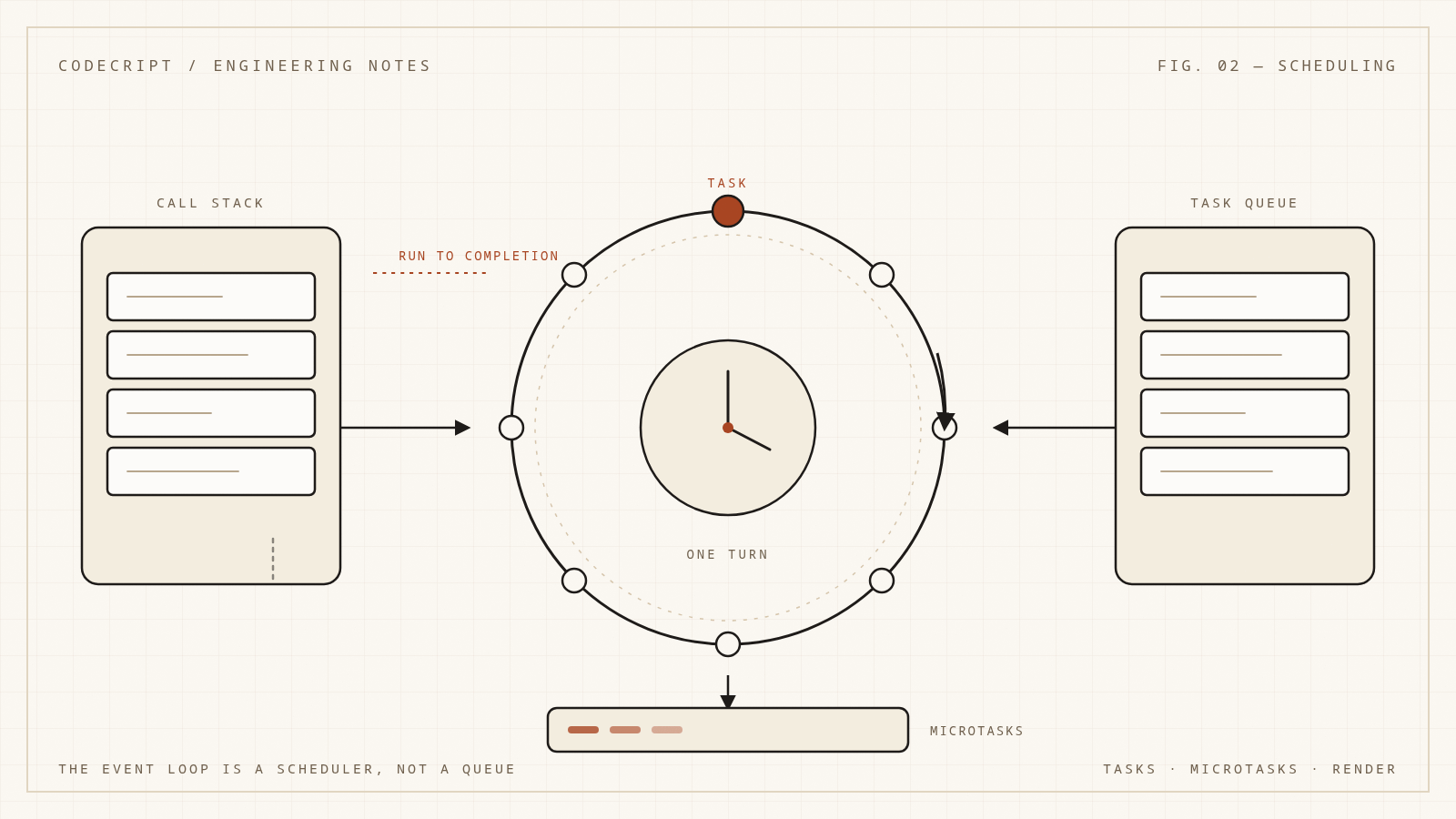
Most explanations of the event loop say the same thing: JavaScript is single-threaded, so work goes into a queue, and the queue is drained one task at a time.
That is close enough to be dangerous. There is not one queue. The order is not simply first-in-first-out. The runtime is not just draining work — it is deciding which kind of work gets to run next, and when the browser is allowed to paint. Once you see the event loop as a scheduler with priorities, a lot of "weird" async behavior becomes predictable. More importantly, the failure modes become diagnosable: the frozen tab, the late timer, the request that takes 20 ms on average and 4 seconds at p99, the promise chain that never yields.
This article builds a precise-enough mental model for both browser JavaScript and Node.js. It covers the call stack, tasks, microtasks, rendering, timers, async/await, the Node phases, the libuv threadpool, and the production symptoms that map to each part. The JavaScript examples are runnable, so you can test your predictions.
The runtime is more than the language
JavaScript the language defines values, functions, execution contexts, and a job queue for promise reactions. It does not define setTimeout, fetch, document, or the file system. Those come from the host: a browser, Node.js, Deno, Bun, or an embedded runtime.
That split matters because "the event loop" is mostly a host concept. The ECMAScript specification describes agents and jobs; the HTML specification describes the browser event loop, task queues, and rendering; Node.js describes its loop in terms of libuv phases. The common shape is the same, but the details differ, and conflating them produces bad advice.
The shared pieces are:
- A call stack. JavaScript executes one function at a time. Synchronous code runs to completion.
- A heap. Objects, closures, and environments live here.
- Queues of work. The host enqueues callbacks for timers, I/O, user events, and promise reactions.
- An event loop. When the stack is empty, the host picks the next unit of work, runs it, and repeats.
The important word is picks. The loop is a policy, not a pipe.
Run-to-completion and why blocking is fatal
JavaScript uses run-to-completion semantics: once a function starts, it runs until it returns or throws. Nothing else on that thread runs in the middle. There is no preemption, no timeslicing of ordinary functions, and no way for a timer callback to interrupt a while loop.
This is a feature. It means you never have to reason about data changing underneath a function in the middle of a statement. It is also the source of the worst performance bug in front-end and Node code: one long synchronous operation blocks everything that shares the thread.
In a browser, the thread that runs JavaScript is usually the main thread. It also handles input, style, layout, paint, and most DOM APIs. A 300 ms synchronous function does not just delay your code; it delays clicks, scrolling, and the next frame. In Node.js, the main thread runs your JavaScript and coordinates I/O; a synchronous CPU-bound operation delays every other request that needs that event loop.
The event loop cannot fix a blocked stack. It can only decide what happens after the stack unwinds. Everything else in this article is about that decision.
Tasks, microtasks, and the call stack
Two categories of queued work explain most behavior:
- Tasks (sometimes called macrotasks) represent discrete units of work: a timer firing, an I/O callback, a user event, a message from another thread.
- Microtasks represent work that must happen before the runtime yields control back to the host: promise reactions,
queueMicrotaskcallbacks,MutationObservercallbacks.
The processing rule is asymmetric, and that asymmetry is the whole game:
- Run the current task to completion.
- Perform a microtask checkpoint: drain the microtask queue completely.
- If the queue keeps producing microtasks, keep draining. The next task does not start until the microtask queue is empty.
- Only then may the host pick another task, render, or run I/O.
A task boundary is a yield point. A microtask boundary is not. That is why a long chain of promise callbacks can starve timers and rendering while a long chain of setTimeout callbacks cannot.
flowchart TD
  A[Pick a task] --> B[Run task to completion]
  B --> C[Microtask checkpoint]
  C --> D{Microtask queue empty?}
  D -- No --> E[Run next microtask]
  E --> C
  D -- Yes --> F{Render opportunity?}
  F -- Yes --> G[requestAnimationFrame, style, layout, paint]
  F -- No --> A
  G --> A
The diagram is a simplification of the HTML processing model, but it captures the priority order: synchronous code, then microtasks, then the next task, with rendering woven between tasks when the browser decides it is time.
A trace you can run
Look at this snippet, run it, and decide what gets logged:
console.log("A");

setTimeout(() => console.log("B"), 0);

Promise.resolve().then(() => console.log("C"));

queueMicrotask(() => console.log("D"));

console.log("E");
The output is:
A
E
C
D
B
Here is the sequence:
AandEare synchronous, so they run before anything else.- The timer callback is a task. It waits for a later turn of the loop.
- The promise callback and the
queueMicrotaskcallback are microtasks. They run immediately after the synchronous script finishes, in the order they were queued. - Only after the microtask queue is empty does the loop pick up the timer task.
Two details are worth internalizing:
setTimeout(fn, 0)means "no sooner than the next task", not "now". In browsers, nested timers are clamped to roughly 4 ms after five levels of nesting. In Node.js, the minimum delay is 1 ms.- Microtasks can starve the loop. If a microtask keeps queueing another microtask, the next task never runs. This is one way to freeze a page without an infinite
whileloop.
Here is a bounded demonstration. The timer is enqueued first, but it cannot run until all 1,000 microtasks have drained:
let count = 0;

function drain() {
  count += 1;
  if (count < 1000) {
    queueMicrotask(drain);
  }
}

setTimeout(() => {
  console.log(`timer ran after ${count} microtasks`);
}, 0);

drain();
This is not a hypothetical. A recursive promise chain that resolves immediately can produce the same effect, and so can a library that schedules "just one more" microtask per update.
Microtask sources are not all the same
Promise.resolve().then(fn) and queueMicrotask(fn) both enqueue a microtask, but the path to the queue differs.
queueMicrotask(fn)enqueuesfndirectly.promise.then(fn)enqueues a promise reaction job when the promise settles. For an already-settled promise, settlement has already happened, so the reaction is enqueued when.thenis called.await valuesuspends the async function and resumes it in a promise job. Evenawaitof a non-promise value yields at least once.
The ordering between these sources is the order in which they were enqueued, not the order in which they were written if some of them depend on other asynchronous steps.
Promise.resolve().then(() => console.log("promise 1"));
queueMicrotask(() => console.log("microtask"));
Promise.resolve().then(() => console.log("promise 2"));
The output is promise 1, microtask, promise 2, because the reactions were enqueued in that order.
Now consider await. A common misconception is that await jumps the queue. It does not. It pauses the function and resumes it as a microtask:
async function task() {
  console.log("1");
  await null;
  console.log("3");
}

console.log("2");
task();
console.log("4");
The order is 2, 1, 4, 3. The synchronous code runs to completion first. task() logs 1, hits the await, and returns a pending promise. The script logs 4. Then the microtask queue runs, resuming task() and logging 3.
The await null is deliberate. Awaiting a non-promise still schedules the continuation asynchronously; it is not an inline jump. If you need to observe the latest DOM state or let a long computation yield, await alone is usually enough to move past the current synchronous block, but it does not move past the entire microtask queue. A chain of awaits is still a chain of microtasks.
Microtask checkpoints and render timing
The browser gets a chance to render between tasks, but not between microtasks. That has a very practical consequence: if you update the DOM and then await a chain of promises, the user may not see the intermediate state.
This example cannot run in the worker-backed runner because it needs the DOM, but the shape is common:
button.addEventListener("click", () => {
  status.textContent = "Saving…";

  save().then(() => {
    status.textContent = "Saved";
  });
});
The browser may go straight from "before click" to "Saved" because both DOM writes happen before the next render opportunity. If the save resolves quickly, there may be no frame that shows "Saving…". The write happened, but paint did not.
If you need the intermediate state to be visible, yield to the renderer:
button.addEventListener("click", async () => {
  status.textContent = "Saving…";

  await new Promise((resolve) => requestAnimationFrame(resolve));

  await save();
  status.textContent = "Saved";
});
requestAnimationFrame runs before paint, so resolving a promise there schedules the continuation after the browser has had a chance to do its rendering work. This is not a guarantee that a frame was displayed — the browser can still coalesce frames — but it is the right tool for "wait until the next paint opportunity."
The rendering pipeline itself is worth knowing:
- Style recalculation. The browser determines which CSS rules apply after DOM or class changes.
- Layout. It computes geometry: positions and sizes.
- Paint. It records draw commands into layers.
- Composite. It combines layers on the compositor thread, often independently of the main thread.
requestAnimationFrame callbacks run before style and layout in the update-the-rendering steps. ResizeObserver callbacks run after layout and before paint, which is why they are useful for correcting layout-dependent state. IntersectionObserver callbacks are delivered asynchronously and are not tied to a specific frame in the same way. Layout reads and writes interleaved in a loop can force synchronous layout, which is the classic "layout thrashing" performance bug.
Tasks have sources, and sources have different priorities
In the HTML model, each agent has one or more task queues, and each queue has a task source. Timers, user interaction, networking, and DOM manipulation are different sources. The specification lets the user agent choose among runnable tasks from different sources, with implementation-defined priority and fairness behavior.
In practice, browsers prioritize input and rendering-related work over background timers, and they may throttle timers in background tabs. This is why:
setTimeout(fn, 0)can be delayed by tens or hundreds of milliseconds under load.- A busy page can feel unresponsive even though the JavaScript "only" ran a few tasks.
requestAnimationFrameis the right scheduler for visual updates, notsetTimeout.- Background tabs may clamp timers to roughly once per second (or more aggressively under battery/energy saver modes).
You cannot rely on cross-source ordering. A network response may arrive before or after a timer scheduled for the same time. If the order matters, encode the order in your application logic, not in the scheduler.
Timers are best-effort
setTimeout and setInterval do not guarantee precise execution times. They guarantee a minimum delay before the callback becomes eligible. If the event loop is busy, the callback can run much later.
Several factors affect the delay:
- Nesting clamp. After enough nested timer calls, browsers enforce a minimum delay (commonly 4 ms). This prevents a
setTimeout(fn, 0)chain from monopolizing the loop. - Background throttling. Inactive tabs and hidden windows may be throttled heavily to save power.
- Main-thread work. A long task delays every timer behind it.
- Timer coalescing. Browsers may batch timers to reduce wakeups, especially on mobile.
- Node.js minimum. Node clamps delays below 1 ms to 1 ms, and its timer implementation is tied to the libuv loop, not to wall-clock precision.
This has practical consequences:
- Do not use timers for correctness-sensitive coordination between threads or processes.
- Do not assume a
setIntervalcallback runs exactly N times per second. It schedules the next call after the previous callback completes, but drift accumulates. - For animation, use
requestAnimationFrame, which is aligned with the display refresh and pauses in background tabs. - For "run after the current rendering work,"
requestAnimationFrameorsetTimeout(0)is usually appropriate; for "run when idle,"requestIdleCallbackexists but has historically had uneven browser support and no guarantee of running at all.
A timer is a request, not a commitment.
Rendering is part of the loop, not a separate thread
It is tempting to think of the browser as running JavaScript and then, separately, painting. In reality, rendering is scheduled by the same event loop machinery. The browser decides when to update the rendering after tasks and microtasks have completed.
The main thread is shared, but compositing can happen on a separate compositor thread. That is why some animations — transforms and opacity, in particular — can remain smooth even when JavaScript is busy. They are handled by the compositor without waiting for the main thread. Layout-affecting properties such as width, top, and margin cannot be handled that way; changing them forces style and layout on the main thread.
This is the performance reason to prefer compositor-friendly animations. It is also the reason a long task can freeze scrolling: input and scroll handling share the main thread, even if some compositing continues.
There is a common misconception that microtasks run "before rendering." A more precise statement is that the browser performs a microtask checkpoint after a task and before it considers rendering. Microtasks queued during rendering-related callbacks are also processed before the next paint in most implementations. The key invariant is not "microtasks never render"; it is "rendering is not interleaved with a running task or an unfinished microtask drain."
Async/await in depth
async/await is syntax over promises and microtasks, but the details matter when you are debugging ordering.
An async function:
- Starts executing synchronously until the first
await. - Returns a promise immediately at that point.
- Schedules the continuation when the awaited value settles.
- Resumes in a microtask, with its local environment intact.
async function fetchValue() {
  console.log("fetch: start");
  const value = await Promise.resolve(21);
  console.log(`fetch: ${value * 2}`);
  return value;
}

console.log("before");
const promise = fetchValue();
console.log("after");
await promise;
console.log("done");
The output is before, fetch: start, after, fetch: 42, done. The function body starts synchronously, suspends at the await, and the caller continues. The continuation runs later, as a microtask. Top-level await in this runnable snippet is supported by the worker wrapper, which embeds the code in an async function.
Two less obvious consequences:
try/catcharound anawaitcatches rejections that occur while the function is suspended, because the rejection is delivered when the continuation resumes.- An async function that never settles keeps its entire environment alive. A pending promise is a retained closure.
A common source of unhandled rejections is fire-and-forget async work:
async function save() {
  throw new Error("disk full");
}

save();

await new Promise((resolve) => setTimeout(resolve, 0));
console.log("still running");
In a browser, the rejection surfaces as an unhandledrejection event. In Node.js, it surfaces as an unhandledRejection process event, and depending on the version and flags, may terminate the process. The lesson is not "always await everything"; it is "every promise needs an owner." If you intentionally detach, attach a catch handler that logs or reports:
async function save() {
  throw new Error("disk full");
}

save().catch((error) => {
  console.log(`handled: ${error.message}`);
});

await new Promise((resolve) => setTimeout(resolve, 0));
The handler does not make the failure disappear; it makes the failure owned. Someone decided to log it, report it, or retry it. That is the difference between a controlled degradation and a process crash at 3 a.m.
The Node.js event loop
Node.js has the same high-level model but a different loop implementation, built on libuv. The loop runs in phases, and between phases it drains the process.nextTick queue and the promise microtask queue.
The phases, in order:
- Timers. Executes callbacks whose time has elapsed.
- Pending callbacks. Executes certain system-level callbacks deferred from the previous iteration.
- Idle, prepare. Internal housekeeping.
- Poll. Retrieves new I/O events and executes I/O callbacks. The loop may block here waiting for I/O when there is nothing else to do.
- Check. Executes
setImmediatecallbacks. - Close callbacks. Executes close handlers such as socket
close.
Between each phase, Node drains process.nextTick and promise microtasks. That means process.nextTick callbacks run before promise reactions, and both run before the loop advances to the next phase.
// Browser-safe demonstration of the priority idea.
const order = [];

queueMicrotask(() => order.push("microtask"));
setTimeout(() => {
  order.push("timer");
  console.log(order.join(" -> "));
}, 0);
The Node-specific difference is easiest to see in a real Node process:
const order = [];

setTimeout(() => order.push("timeout"), 0);
setImmediate(() => order.push("immediate"));
process.nextTick(() => order.push("nextTick"));
Promise.resolve().then(() => order.push("promise"));

setTimeout(() => console.log(order.join(" -> ")), 10);
The nextTick and promise entries come first. The relative order of timeout and immediate at the top level is not strictly deterministic across platforms and load. Inside an I/O callback, setImmediate is guaranteed to run before timers, because the check phase follows the poll phase.
process.nextTick has a dangerous property: it is not a "next tick of the loop" in the way the name suggests. It runs after the current operation, before the loop continues, and recursive nextTick calls can starve I/O and timers. This is why the Node documentation recommends setImmediate or promises for most application-level deferral.
The libuv threadpool is where blocking hides
Node is single-threaded for JavaScript, but it is not single-threaded internally. libuv maintains a threadpool (four threads by default) for operations that cannot be done asynchronously by the operating system or that are CPU-heavy but exposed through async APIs. Common users include:
- File system operations (
fs.readFile,fs.writeFile, and friends) - DNS lookups (
dns.lookup, notdns.resolve) - Cryptography (
crypto.pbkdf2,crypto.scrypt, some random operations) - Compression (
zlib) - Some native addons
If four file-system operations each take 100 ms, a fifth can wait for a thread. Increasing UV_THREADPOOL_SIZE may help, but it also increases memory use and can mask a design problem. More importantly, a CPU-bound operation in the threadpool still competes with other threadpool work; it does not make the main thread faster.
The main thread is still the bottleneck for JavaScript execution. A JSON.parse of a 50 MB document, a synchronous regular expression with catastrophic backtracking, or a tight numeric loop blocks everything, regardless of how many libuv threads exist.
Backpressure: the loop's memory
A queue is a buffer, and a buffer without a bound is a memory leak with extra steps. The event loop is full of queues: pending timers, pending promise reactions, I/O buffers, socket write buffers, stream queues, and message queues between workers.
Backpressure is the mechanism that tells a producer to slow down when a consumer cannot keep up. In Node.js streams, write() returns false when the internal buffer is full, and the stream emits drain when it is safe to continue. In browsers, fetch response bodies are streams with ReadableStream backpressure. In worker messaging, postMessage queues messages faster than the worker can process them.
// Node.js shape: respect the return value and wait for drain.
function writeChunk(stream, chunk) {
  if (stream.write(chunk)) return Promise.resolve();
  return new Promise((resolve, reject) => {
    stream.once("drain", resolve);
    stream.once("error", reject);
  });
}
Ignoring backpressure produces the classic failure: memory climbs, latency climbs, and the process eventually crashes or gets OOM-killed. The event loop is not a storage layer. If producers can outrun consumers, the system needs an explicit limit: a bounded queue, a concurrency semaphore, a rate limit, or a load-shedding policy.
Production failure modes mapped to the model
Once you have the model, symptoms become clues.
Symptom: the UI freezes for hundreds of milliseconds. Look for long tasks on the main thread. Common causes are large synchronous JSON parsing, expensive layout reads/writes, huge DOM updates, and CPU-heavy loops. Fix by splitting work, moving it to a worker, virtualizing lists, or reducing the work per frame.
Symptom: timers fire late or drift. The loop is busy, the tab is throttled, or the timer is nested. Do not use timers as a clock. Measure the actual elapsed time and compensate if needed.
Symptom: a promise chain never lets rendering happen. The chain is producing microtasks without yielding to a task. Insert an actual yield — a timer, requestAnimationFrame, setImmediate in Node, or a worker round-trip — not just another await.
Symptom: throughput is fine but p99 latency is terrible. A periodic long task is blocking the loop. Average latency hides it because most requests arrive between blocks. Measure event-loop delay and tail latency, not just requests per second.
Symptom: Node memory grows under file I/O. Check the threadpool queue and stream buffers. If producers are faster than consumers, you have a backpressure bug, not a garbage collection bug.
Symptom: an unhandled rejection crashes the process. A detached promise lost its owner. Add an explicit catch or a process-level handler that reports and decides whether to exit.
How to measure the loop
You cannot fix what you do not measure, and "the CPU is at 40%" does not tell you whether the event loop is healthy.
In the browser:
- PerformanceObserver with
longtaskreports tasks longer than 50 ms. This is the closest standard signal for main-thread blocking. - Interaction to Next Paint (INP) measures responsiveness from the user's perspective. It is a better signal than total blocking time for modern pages, though both are useful.
- Chrome DevTools Performance panel shows tasks, microtasks, rendering, layout, and paint on a timeline. Look for long yellow blocks and forced synchronous layouts.
performance.now()around suspected code is crude but effective for confirming a hypothesis.
In Node.js:
perf_hooks.monitorEventLoopDelay()samples event-loop delay and exposes a histogram. A p99 delay in the hundreds of milliseconds explains a lot of tail latency.--prof/ flame graphs / Clinic.js show where CPU time goes.async_hookscan trace async resource lifetimes, though it has overhead and is best used selectively.- OpenTelemetry traces with span durations reveal whether time is spent in the loop, in the threadpool, or waiting on a downstream service.
A useful production dashboard includes:
- Event-loop delay percentiles
- CPU utilization and run-queue length
- Heap used and GC pause time
- Active handles and requests
- Threadpool queue depth (if instrumented)
- Request latency percentiles, not just averages
Designing around the loop
The event loop is a single resource. Design as if it were a scarce one.
Keep tasks short. Aim for well under 50 ms per task on the main thread. Break large work into chunks with explicit yield points. A loop that processes 10,000 items should not run all 10,000 in one task if the page needs to stay responsive.
Move CPU-bound work off the main thread. In the browser, use a Web Worker. In Node.js, use worker_threads, a child process, or a separate service. JSON parsing, image processing, compression, and large numerical computations are typical candidates.
Use the right scheduler for the job. Use requestAnimationFrame for visual updates, setTimeout for coarse deferral, queueMicrotask for work that must complete before yielding, and setImmediate in Node when you want to yield past I/O polling. Use scheduler.postTask where available for priority-aware browser scheduling.
Bound every queue. Concurrency limits, rate limits, and backpressure are not optional at scale. A queue that can grow without bound is a future outage.
Do not block on synchronous I/O. In Node.js, synchronous file system calls and synchronous crypto belong in startup scripts, not request handlers. In the browser, there is no synchronous network I/O, but synchronous storage and large localStorage reads can still block.
Measure the loop, not just the CPU. A process can use 30% CPU and still have terrible tail latency because one long task arrives every few seconds.
A checklist for debugging async behavior
When the output is not what you expected, ask these questions in order:
- What is on the call stack right now? Synchronous code always wins.
- Which microtasks are queued, and can any of them queue more microtasks? If so, the next task is delayed until the queue is empty.
- Which task will the loop pick next? Timer, I/O, user event, or rendering? Cross-source ordering is not guaranteed.
- Is there a render or I/O phase between the work you have and the work you expect?
requestAnimationFrame, layout, and the poll phase all change the timing. - Is anything blocking the loop? A long task explains almost every "the timer is late" mystery.
- Is this browser code or Node code? The phases and priority rules are not identical.
If you can answer those six questions, most async behavior stops being mysterious. The event loop is not a single queue with a simple order. It is a scheduler with a priority model, a rendering integration, and host-specific phases. Once you know the model, you can design around it instead of fighting it.
The short version
- Synchronous code runs to completion. Nothing interrupts it.
- Microtasks drain completely before the next task or render.
- Tasks are best-effort units of work; different sources have different priorities.
- Timers guarantee a minimum delay, not a precise execution time.
- Rendering happens between tasks, not inside them, and not between microtasks.
awaitschedules a microtask; it does not make code synchronous.- Node adds phases,
process.nextTick,setImmediate, and a threadpool. - Long tasks are the enemy. Move work, chunk work, or measure the loop.
- Every queue needs a bound; every promise needs an owner.
The event loop is the contract between your code and the host. Understanding it is less about memorizing a diagram and more about knowing which resource is scarce, which work is allowed to wait, and which work must finish before the next frame or the next request. That is a scheduling problem, and it is the same problem whether you are writing a browser interaction or a Node.js service.