By Gaurav · · 17 min read
- http
- caching
- performance
- cdn
- reliability
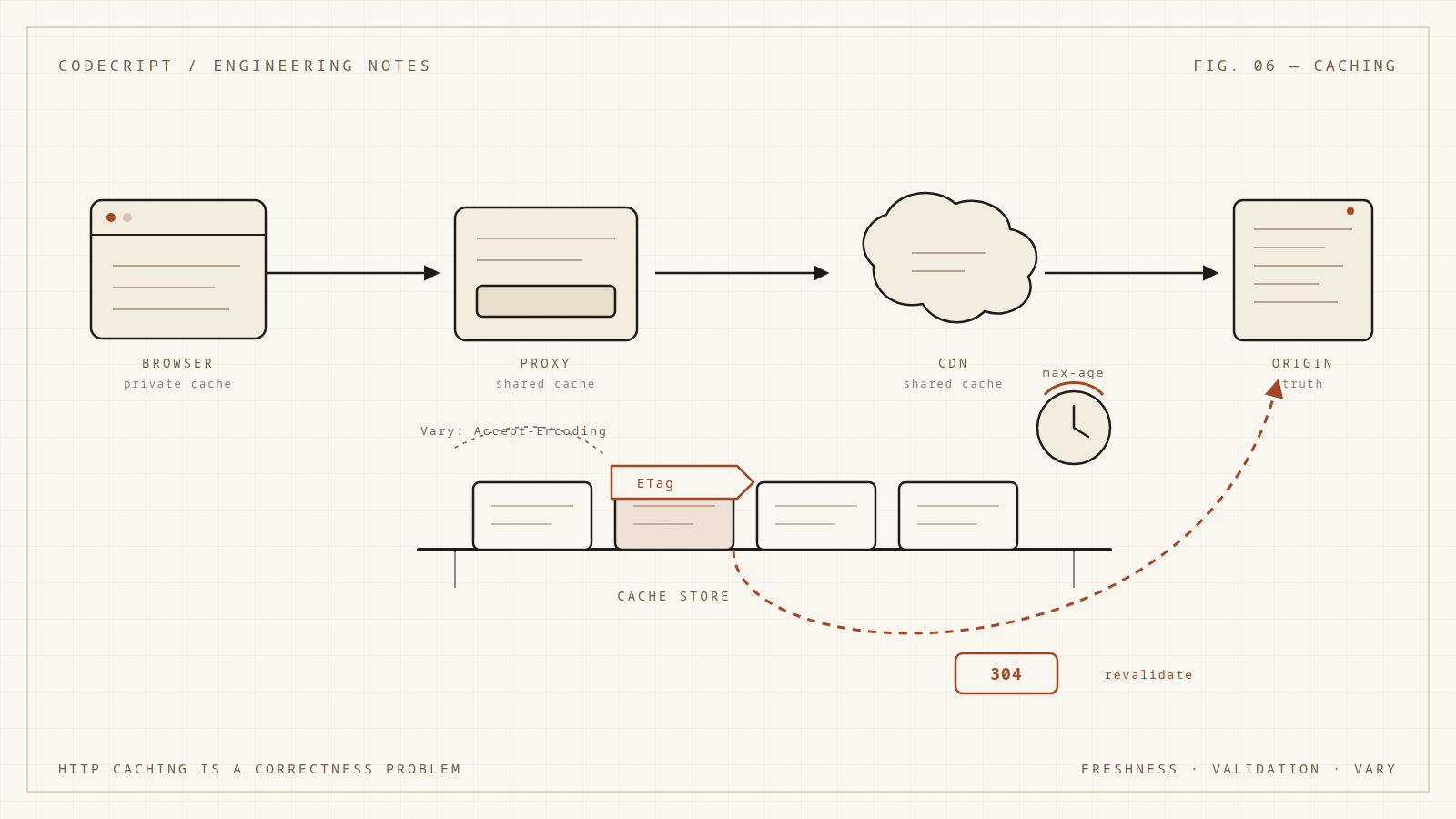
Most teams add caching the way they add logging: somewhere near the end, after the feature works, with a directive copied from a blog post. Cache-Control: public, max-age=3600 looks harmless. It is not. It is a statement that for the next hour, every cache between your server and the user is allowed to answer requests without asking you. If that statement is wrong for even one kind of response, you have shipped a correctness bug that will be extremely hard to reproduce, because it depends on which cache saw which request in which order.
The confusing part is that HTTP caching is not one feature. It is a negotiation between a client, a browser cache, a shared proxy, a CDN, and an origin server, governed by headers that interact in subtle ways. Freshness and validation are separate mechanisms. no-cache does not mean "do not cache." max-age=0 and no-store are not the same. Vary can silently destroy your hit ratio or leak one user's response to another.
This article builds a correct mental model: what a cache key actually is, how freshness is computed, how validators turn a cache hit into a cheap 304, how shared and private caches differ, how invalidation really works, and how to avoid the stampede that appears when a popular entry expires. The JavaScript examples are runnable; they model the decision logic rather than the network, so you can test your understanding of the rules.
What a cache is allowed to do
An HTTP cache stores responses and reuses them. The rules define three questions:
- Is this stored response usable for this request? That is the cache key and the
Varymatch. - Is it fresh enough to use without contacting the origin? That is freshness.
- If it is stale, can it be validated cheaply? That is conditional requests and
304 Not Modified.
Everything else — no-store, private, must-revalidate, stale-while-revalidate — modifies those three questions. If you hold those apart, the directives stop looking like a pile of magic strings.
A cache is also not a single thing. The browser's private cache, a service worker cache, a corporate proxy, and a CDN all follow the same RFC but have different storage, different defaults, and different operational quirks. A private response can be stored by the browser but not by a shared CDN. A public response can be stored by anyone, including a proxy you do not control. That distinction is a security boundary, not a performance hint.
The cache key is not the URL
The primary cache key is the request method plus the target URI. In practice, caches only store responses to GET and HEAD by default; POST, PUT, and DELETE are not cacheable unless the response explicitly says so with headers such as Content-Location, which almost nobody uses correctly.
But the URL is only the beginning. Two requests with the same URL can legitimately need different responses:
- The same page in English and French, negotiated by
Accept-Language. - The same asset compressed with Brotli or gzip, negotiated by
Accept-Encoding. - The same API endpoint returning different JSON for different
Accepttypes. - The same URL with different authentication, which should not be cached publicly at all.
Vary extends the cache key with the request headers listed in its value. Vary: Accept-Encoding means a cached response is only reusable for a request whose Accept-Encoding matches the one that produced it.
The trap is that Vary multiplies the key space. Vary: Accept-Encoding is usually fine because there are only a few common encodings. Vary: User-Agent is a disaster: there are thousands of distinct user-agent strings, and the cache will store a separate copy for each one. Vary: Cookie is worse. Cookies are unique per session, so the effective hit ratio collapses to near zero, and worse, a shared cache may store responses that contain user-specific data.
A cache that cannot match Vary must treat the response as a miss. That is the safe behavior, but it means a single poorly chosen Vary header can silently disable caching for an endpoint while the headers still say max-age=3600.
function cacheKey(request, varyHeaders = []) {
  const parts = [`${request.method} ${request.url}`];

  for (const header of varyHeaders.map((h) => h.toLowerCase()).sort()) {
    const value = request.headers[header] ?? "";
    parts.push(`${header}=${value}`);
  }

  return parts.join("\n");
}

const requests = [
  {
    method: "GET",
    url: "/api/feed",
    headers: { "accept-encoding": "br", "accept-language": "en" },
  },
  {
    method: "GET",
    url: "/api/feed",
    headers: { "accept-encoding": "gzip", "accept-language": "en" },
  },
  {
    method: "GET",
    url: "/api/feed",
    headers: { "accept-encoding": "br", "accept-language": "fr" },
  },
];

const vary = ["Accept-Encoding"];

for (const request of requests) {
  console.log(cacheKey(request, vary));
}
With Vary: Accept-Encoding, the first two requests map to different keys and the third shares the first key. Add Accept-Language and all three diverge. The point is not that Vary is bad; it is that every header you add to it is a promise to store and look up an additional dimension.
A related subtlety: Vary: * means the response cannot be reused for any other request. It is effectively no-store for shared caches, though the semantics are about matching rather than storage.
Freshness is arithmetic, not a suggestion
A cached response has an age, computed from the Age header and the time since it was stored. It has a freshness lifetime, computed from directives such as max-age. The response is fresh while age < freshness_lifetime. While fresh, a cache can serve it without contacting the origin.
Cache-Control: max-age=600 means the response is fresh for 600 seconds from the time it was generated. s-maxage=600 does the same for shared caches only, and overrides max-age for them. That distinction lets you say "browsers may keep this for a day, but the CDN should revalidate every minute."
The Age header is how a shared cache tells downstream caches how old the response already is. If a CDN serves a response that has been in its cache for 300 seconds, it should send Age: 300. Without it, a downstream cache could treat the response as brand new and extend its life far beyond the origin's intent.
function freshness(response, nowSeconds) {
  const directives = parseCacheControl(response.headers["cache-control"] ?? "");
  const maxAge = Number(directives["max-age"] ?? 0);
  const age = Number(response.headers.age ?? 0);
  const resident = nowSeconds - response.storedAt;

  const currentAge = age + resident;
  const fresh = !directives["no-store"] && currentAge < maxAge;

  return {
    currentAge,
    maxAge,
    fresh,
    remaining: Math.max(0, maxAge - currentAge),
  };
}

function parseCacheControl(value) {
  return Object.fromEntries(
    value
      .split(",")
      .map((part) => part.trim())
      .filter(Boolean)
      .map((part) => {
        const [name, raw] = part.split("=");
        return [
          name.toLowerCase(),
          raw === undefined ? true : raw.replaceAll('"', ""),
        ];
      }),
  );
}

const response = {
  storedAt: 1000,
  headers: {
    "cache-control": "public, max-age=600",
    age: "120",
  },
};

console.log(freshness(response, 1100));
console.log(freshness(response, 1700));
The response is 100 seconds old at now=1100 (120 seconds of upstream age plus 100 seconds resident), so it has 500 seconds of freshness left. At now=1700, its age is 700 seconds and it is stale. A cache that ignores Age would think it still had 400 seconds.
Heuristic freshness
If a response has no explicit freshness information, a cache may apply a heuristic. The common heuristic is 10% of the time since the response's Last-Modified date, capped by the cache. This is why some responses are cached even though nobody configured caching.
Heuristic caching is a frequent source of surprise. A JSON API response with Last-Modified but no Cache-Control can be cached for minutes or hours by a CDN that decides it is safe. If you do not want that, send an explicit directive. "No caching header" is not the same as "do not cache."
Modern practice is to be explicit everywhere. A response that should not be stored gets Cache-Control: no-store. A response that can be reused gets an explicit max-age or s-maxage. Relying on heuristics is how you end up debugging a cache you did not know existed.
Validation: the cheap revalidation
When a response is stale, a cache does not have to fetch the full body. If the stored response has a validator — an ETag or a Last-Modified date — the cache can send a conditional request:
GET /articles/42 HTTP/1.1
If-None-Match: "v42-abc123"
If the representation has not changed, the origin responds:
HTTP/1.1 304 Not Modified
ETag: "v42-abc123"
Cache-Control: public, max-age=60
A 304 has no body. That is the entire point: it refreshes the cached entry's freshness without transferring the payload. For a large image or a megabyte of JSON, that is a significant saving.
An ETag is an opaque validator. It can be a hash of the content, a version number, or a database revision. The only rule is that it must change when the representation changes and must be stable when it does not. A weak validator (W/"...") promises semantic equivalence, not byte equality; strong validators promise byte equality and are required for range requests.
// A small deterministic hash for the demo. Production code should use a
// cryptographic hash or a version column, not this function.
function hash(input) {
  let h = 2166136261;
  for (let i = 0; i < input.length; i += 1) {
    h ^= input.charCodeAt(i);
    h = Math.imul(h, 16777619);
  }
  return (h >>> 0).toString(36);
}

function etagFor(body) {
  return `"${hash(body)}"`;
}

function handleConditionalGet(request, representation) {
  const current = etagFor(representation.body);
  const ifNoneMatch = request.headers["if-none-match"];

  if (ifNoneMatch && ifNoneMatch === current) {
    return {
      status: 304,
      headers: {
        etag: current,
        "cache-control": representation.cacheControl,
      },
      body: null,
    };
  }

  return {
    status: 200,
    headers: {
      etag: current,
      "cache-control": representation.cacheControl,
      "content-type": representation.contentType,
    },
    body: representation.body,
  };
}

const representation = {
  body: JSON.stringify({ id: 42, title: "Caching" }),
  contentType: "application/json",
  cacheControl: "public, max-age=60, must-revalidate",
};

const first = handleConditionalGet({ headers: {} }, representation);
console.log(first.status, first.headers.etag);

const second = handleConditionalGet(
  { headers: { "if-none-match": first.headers.etag } },
  representation,
);
console.log(second.status, second.body);
If-None-Match can contain a list of tags, and it takes precedence over If-Modified-Since. If both are present, the entity tag comparison wins. If-Modified-Since compares timestamps at one-second granularity, which is why ETag is the better validator: two changes within the same second can produce the same Last-Modified value and a false 304.
There is a well-known interaction between ETag and compression. If a CDN compresses a response, it must not reuse the origin's ETag for the compressed bytes unless it also modifies the tag, because the representation has changed. Many CDNs weaken the tag or generate their own. If you compute a strong ETag on the uncompressed body and a proxy serves a gzip version with the same tag, a conditional request can produce an inconsistent 304. The safe approach is to let the CDN manage validators for transformed representations, or to vary the tag by encoding.
The directives, in plain language
Cache-Control is the main vocabulary. The directives that matter most:
| Directive | Meaning | Common mistake |
|---|---|---|
max-age=N |
Fresh for N seconds in any cache | Assuming it prevents revalidation; it only sets freshness |
s-maxage=N |
Fresh for N seconds in shared caches; overrides max-age there |
Forgetting CDNs honor it over max-age |
no-cache |
May store, but must revalidate before each reuse | Reading it as "do not store" |
no-store |
Must not store the response at all | Using it for performance instead of privacy |
private |
Only a private cache (browser) may store it | Assuming it stops browser caching |
public |
Any cache may store it | Using it for authenticated responses |
must-revalidate |
Once stale, must not serve without successful revalidation | Confusing with no-cache |
immutable |
The representation will never change while fresh | Using it for mutable content |
stale-while-revalidate=N |
May serve stale for N seconds while refreshing | Assuming all clients support it |
stale-if-error=N |
May serve stale for N seconds if the origin errors | Using it to hide persistent failures |
The no-cache versus no-store distinction is the one that causes the most damage. no-cache is a validation requirement, not a storage prohibition. A response marked no-cache can be stored by the browser, and it will be reused if the origin returns 304. no-store forbids storage entirely, which is what you want for a response containing a password reset token or a one-time view of sensitive data.
private is a security directive, not a performance one. A response marked private, max-age=600 can live in the user's browser for ten minutes. It cannot be stored by a shared cache. If the response contains user-specific data, private is the minimum; no-store may be more appropriate.
must-revalidate matters when a cache is disconnected from the origin. Without it, a cache may serve a stale response under certain conditions. With it, a stale response must not be used without a successful revalidation. For anything where stale data is dangerous — account balances, permissions, inventory — must-revalidate is not optional.
immutable is a strong promise that the resource will not change during its freshness lifetime. It lets the browser skip revalidation even on reload. It is appropriate for content-addressed assets: /assets/app.9f3c2a.js will never change, because a change produces a new filename. It is not appropriate for /index.html.
Shared caches are a different threat model
A browser cache serves one user. A shared cache serves many. That difference turns caching into an access-control problem.
The classic bug is an authenticated response cached publicly. A request carries Authorization: Bearer ..., the origin returns user-specific JSON with Cache-Control: public, max-age=300, and a CDN stores it under the URL. The next user requests the same URL without credentials and receives the first user's data. This is not hypothetical; it has caused real breaches at real companies.
The defenses are straightforward and must be enforced at the framework or gateway level, not left to individual handlers:
- Authenticated responses default to
privateorno-store. - Shared caches must not store responses to requests with
Authorizationunless explicitly allowed bypublic,s-maxage, ormust-revalidate. Set-Cookiein a response is a strong signal that the response is user-specific; shared caches generally do not store it.- A
Vary: Cookieresponse should be treated as uncacheable by shared caches in practice, because the key space is unbounded.
There is also the cache poisoning angle. If a cache keys on a URL but the origin's response depends on a header that is not in Vary, an attacker can cause the cache to store a malicious or incorrect response for other users. This is how many web cache poisoning vulnerabilities work: an unkeyed input — a header, a query parameter, a cookie — influences the response, and the attacker arranges for the cache to store the result under a shared key. The fix is to ensure the cache key covers every input that affects the response, or to normalize and validate those inputs at the edge.
A useful rule: the cache key must be a superset of the inputs that influence the response. If it is not, the cache is guessing. Guessing is sometimes acceptable for performance, but never for security.
Invalidation is the hard part
There are only two hard things in computer science, and cache invalidation is one of them because the cache and the origin are separate state machines. You cannot atomically update both. Any invalidation scheme is a compromise between freshness, latency, and complexity.
The main strategies:
1. Versioned URLs. The most reliable approach. Content that changes gets a new URL: /app.9f3c2a.js, /api/v2/feed. The old URL can be cached forever because it will never change. The HTML that references the asset is short-lived and revalidated. This is how most build pipelines handle static assets, and it is the least surprising scheme.
2. Short freshness plus validation. Set a short max-age and a strong ETag. The cache revalidates frequently, and unchanged content costs a 304 rather than a full response. This is simple and safe, at the cost of more origin traffic.
3. Explicit purge. The CDN exposes an API to purge a URL or a tag. The origin calls it after a write. This gives fast invalidation but introduces a distributed failure mode: the purge can fail, arrive out of order, or race with an in-flight request that repopulates the cache with the old value.
4. Surrogate keys and tag-based invalidation. Responses are tagged with identifiers — Surrogate-Key: article-42 author-7 — and a purge invalidates every response with that tag. This is more expressive than URL purging and handles list pages that embed the changed object.
5. Cache-aside with a shared store. The application reads from Redis or Memcached and populates on miss. Invalidation is a DEL on write. This is not HTTP caching, but it shares the same race: a reader can fetch the old value, the writer can update the database and delete the key, and the reader can then write the stale value back. The fix is a versioned key, a short TTL, or a write-through protocol.
The race in option 5 is worth spelling out because it appears in every cache-aside system:
Reader: GET key -> miss
Reader: SELECT ... -> old value
Writer: UPDATE ... -> new value
Writer: DEL key
Reader: SET key old value   <-- stale value restored
The window is small, but under load it happens. Mitigations include deleting after the write with a delay, using a version number in the key, or using a lease/lock so only one reader can populate a key. None of them are free. The pragmatic answer is usually a short TTL plus accepting a brief stale window, because a perfectly consistent cache is a contradiction.
Cache stampede and request coalescing
When a popular cached response expires, every request for it becomes a miss at the same moment. If the origin takes 500 ms to generate the response and 10,000 requests arrive in that window, the origin receives 10,000 identical expensive requests. This is the thundering herd or cache stampede, and it is one of the most common ways a cache turns from a shield into a weapon.
The defenses, in increasing order of sophistication:
- A lock or lease. The first miss acquires a lock and generates the response; the others wait or serve stale. In Redis,
SET key value NX PX 5000is a common lease primitive. - Request coalescing (single-flight). Within a process, deduplicate concurrent calls for the same key so only one executes the underlying function. This is easy and effective for a single instance.
- Stale-while-revalidate. Serve the stale response immediately and refresh in the background. Users see slightly old data instead of waiting, and the origin sees one refresh rather than a burst.
- Probabilistic early expiration. Refresh a fraction of requests before the entry actually expires, spreading the refresh over time instead of synchronizing it.
- Jittered TTLs. Add randomness to expiration times so entries created together do not expire together.
Here is a single-flight implementation:
function createSingleFlight() {
  const inflight = new Map();

  return async function singleFlight(key, load) {
    if (inflight.has(key)) {
      return inflight.get(key);
    }

    const promise = (async () => {
      try {
        return await load();
      } finally {
        inflight.delete(key);
      }
    })();

    inflight.set(key, promise);
    return promise;
  }
}

let loads = 0;
const singleFlight = createSingleFlight();

async function loadExpensive(key) {
  loads += 1;
  await new Promise((resolve) => setTimeout(resolve, 10));
  return `value:${key}`;
}

const results = await Promise.all(
  Array.from({ length: 20 }, () => singleFlight("article:42", () => loadExpensive("article:42"))),
);

console.log(`distinct results: ${new Set(results).size}`);
console.log(`origin loads: ${loads}`);
Twenty concurrent callers, one origin load. The finally is essential: if the load throws, the promise must be removed from the map, or the key is poisoned forever. A rejected promise left in an in-flight map is a subtle outage that only appears after the first error.
Single-flight is per process. Across instances, you need a shared lease or a stale-while-revalidate policy. A shared lock must have a timeout, or a crashed holder blocks the key indefinitely. A lease without a timeout is a distributed deadlock.
stale-while-revalidate is the more user-friendly option when the data can tolerate a little age:
function createSwrCache(load, ttlMs, staleMs) {
  const entries = new Map();
  const refreshes = new Map();

  function refresh(key, now) {
    if (refreshes.has(key)) return refreshes.get(key);

    const promise = Promise.resolve()
      .then(() => load(key))
      .then((value) => {
        entries.set(key, { value, freshUntil: now + ttlMs });
      })
      .finally(() => refreshes.delete(key));

    refreshes.set(key, promise);
    return promise;
  }

  return async function get(key, now = Date.now()) {
    const entry = entries.get(key);

    if (!entry) {
      await refresh(key, now);
      return { value: entries.get(key).value, state: "miss" };
    }

    if (now <= entry.freshUntil) {
      return { value: entry.value, state: "fresh" };
    }

    if (now <= entry.freshUntil + staleMs) {
      // Serve stale immediately, refresh in the background.
      refresh(key, now);
      return { value: entry.value, state: "stale" };
    }

    await refresh(key, now);
    return { value: entries.get(key).value, state: "expired" };
  };
}

let version = 1;
const get = createSwrCache(
  async (key) => `${key}:v${version}`,
  100,
  1000,
);

console.log(await get("feed", 0));
version = 2;
console.log(await get("feed", 150));
await new Promise((resolve) => setTimeout(resolve, 0));
console.log(await get("feed", 160));
The stale window is a product decision. How old can the data be before it is misleading? A feed can be seconds old. An account balance cannot. The header describes the policy; the product owner decides the number.
Browser caching is not CDN caching
The same Cache-Control header is interpreted by different caches with different capabilities. A few practical differences:
- Browsers have a private cache and may also have a service worker cache. A service worker can intercept requests and implement its own policy, which can override or complement the HTTP headers.
- Browser reloads have special behavior. A normal reload may revalidate even fresh responses; a hard reload bypasses the cache.
immutableis one of the few directives that changes reload behavior. - CDNs often have their own configuration layer. A CDN may ignore origin headers, apply a default TTL, or cache responses the origin marked
private, depending on the plan and settings. Never assume the edge honors your headers without verifying. - CDNs may cache by default on file extension or path pattern. A JSON API with no
Cache-Controlcan be cached for minutes by a CDN that applies a default. Explicit headers are the only defense.
The Age header is a good diagnostic. If a response arrives with Age: 4321 and you set max-age=60, something upstream cached it far longer than you intended. Similarly, an X-Cache: HIT or CF-Cache-Status: HIT tells you the edge served it without contacting the origin. Instrument these headers in your client and in synthetic checks.
A common operational mistake is testing cache behavior with a browser in incognito mode. Incognito avoids the local cache, but it does not avoid the CDN. If you want to test origin behavior, bypass the CDN with a cache-busting query parameter or a direct origin hostname, and remember that query parameters are often part of the cache key.
Caching and correctness: the questions to ask
When you add a cache, ask:
- Is this response the same for every user? If not, it must be
privateorno-store, or keyed by something that distinguishes users. - What inputs change the response? Every one of them must be in the cache key, via the URL or
Vary. If you cannot enumerate them, do not cache publicly. - How stale can this be? That number is
max-ageors-maxage, and it should come from the product, not from a default. - What happens when it is stale? Revalidate, serve stale, or block.
must-revalidatevs.stale-while-revalidateis a deliberate choice. - How does a write invalidate it? Versioned URL, purge, tag, or TTL. If there is no answer, the cache is eventually consistent by accident.
- What happens on a cold cache? A cache that is essential at steady state must not take down the origin when it is empty. Prewarm, rate-limit the fill, or coalesce requests.
- What happens when the cache is wrong? You need a way to purge or bypass quickly, and a way to detect the problem. Log cache hit ratios and origin error rates together.
The last question is the one teams forget. A cache is a distributed system with its own failure modes, and the failure is often silent: the cache keeps serving a stale response, the origin looks healthy, and the bug is only visible to users. Monitoring hit ratio alone is not enough; monitor freshness, purge latency, and the age distribution of served responses.
A minimal, correct policy set
If you need a starting point rather than a theory, here is a defensible default set:
| Response type | Header |
|---|---|
Content-addressed static asset (/assets/app.[hash].js) |
public, max-age=31536000, immutable |
| HTML entry point | no-cache (revalidate every time, cheap 304) |
| Public API, non-personalized | public, s-maxage=60, stale-while-revalidate=300 |
| Authenticated API | private, no-store or private, max-age=0, must-revalidate |
| Sensitive one-time data | no-store |
| Error responses | no-store (do not let a transient error become sticky) |
| Redirects | public, max-age=300 if stable; no-store if not |
The reasoning behind each:
- Hashed assets never change, so they can be cached forever. The HTML that references them is short-lived, so a deploy is visible immediately.
no-cacheon HTML means the browser stores it but revalidates. With anETag, an unchanged page costs a tiny304.- Public API responses can be shared but should not be stale for long.
stale-while-revalidateabsorbs bursts without making users wait. - Authenticated responses are the highest-risk category. Default to
privateandno-store; opt into caching only with a clear reason. - Sensitive data should not be in a cache at all, because you cannot control every cache in the path.
- Errors are often generated by a failing backend. Caching them can turn a transient failure into a sustained one.
- Stable redirects are safe to cache; temporary ones are not.
The model to keep
HTTP caching is a set of rules about reuse, not a performance switch. A response is reusable only if the cache key matches, the response is fresh or successfully validated, and no directive forbids it. Vary extends the key. Age tells you how old the response already is. ETag makes revalidation cheap. private and no-store are security boundaries. Invalidation is a distributed problem with no perfect solution, only tradeoffs.
The practical discipline is to be explicit. Decide the lifetime, the key, and the invalidation path for every cacheable response, and write them down. A cache is only safe when the team agrees on what it is allowed to serve. Everything else is a latent bug that appears when the cache is warm and the origin is busy — which is exactly when you can least afford it.